


Hypic - Photo Editor & AI Art
3.11.49K Reviews
App Specs
- Version
- 9.6.0
- Updated On
- License
- Free
- Downloads
- 100,000,000+
- Developer
- Bytedance Pte. Ltd.
- Categories
- Photography
- Platform
- Android, iOS
Screenshots
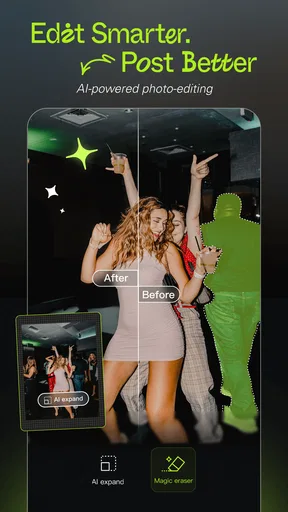
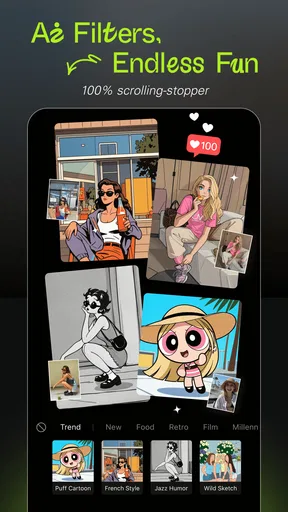
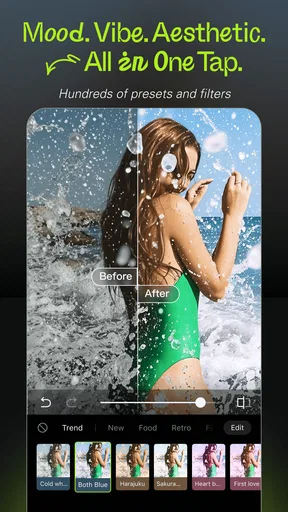
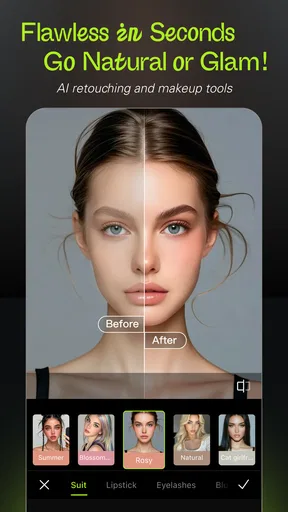
 Analysis by AppCompare
When I consider a photo editor, I want more than eye-catching effects: I also want to know what choices I have when a picture is personal. Hypic - Photo Editor & AI Art sits in a category where editing can involve portraits, family moments, screenshots, and other images I may not want to treat casually. My take is to enjoy its creative tools while making deliberate decisions about which photos I open and what I do with the finished image.
What I can judge, and what I should not assume
Hypic is a free photography app from Bytedance Pte. Ltd., and it has an average rating of 4.3 from around 215,000 ratings, alongside more than 50 million installs. Those figures suggest that plenty of people have tried it, but popularity is not a substitute for checking whether an app suits your comfort level. I would treat the editing experience and my own choices as the useful basis for deciding whether to keep using it.
I also separate what I can see while editing from broader questions about data handling. A polished interface or a successful effect does not, by itself, tell me how an image is processed or retained. I avoid guessing about permissions or privacy practices, and I recommend that readers review the choices shown on their own device before granting access or selecting a photo. That is especially sensible with any editor that offers AI-driven transformations.
Make the first test a low-stakes one
Rather than beginning with a sensitive portrait, I’d start with a photo that would not bother me if I decided not to use the result: a cup of coffee, a plant, or a street scene. That gives me room to learn how Hypic’s filters, retouching, and art effects change an image without making a personal photo my experiment. I can also compare the edited version with the original before deciding whether the effect feels right.
This small habit helps answer a practical question: do I like the result enough to make it part of my normal workflow? If I do, I can move on to less disposable images while still considering each image individually. If an edit feels too strong or the process does not feel comfortable, there is no reason to push through just because an effect is popular.
Keep control of the finished image
I’d treat sharing as a separate decision from editing. Making a picture in the app does not mean I have to post it, and saving an edited image for myself can be a perfectly good outcome. Before sharing a portrait or a photo that includes other people, I’d check that the crop, retouching, and final look are what I actually want them to see.
It is also worth remembering that a stylized result can change the impression a photo gives. An AI art treatment may be fun for a profile image or a playful post, but it is a poor fit when I need an untouched record of an event or an accurate image for practical use. For those cases, I would keep the original and use a restrained edit—or choose a workflow designed around preserving the image faithfully.
Worth Reading Before You Choose

Flipboard Shows What News Apps Must Do Beyond the Feed

Switching to Android Auto Means Rethinking Your Driving Routine

Google Calendar Makes a Crowded Week Easier to Manage

Ludo King Makes the Most of the Minutes Between Plans

Baby Panda World Brings Quick Play to Modern Phones, but Its Game Library Feels Busy

ESPN’s Live Game View Makes Following Close Games Easier
First Impressions
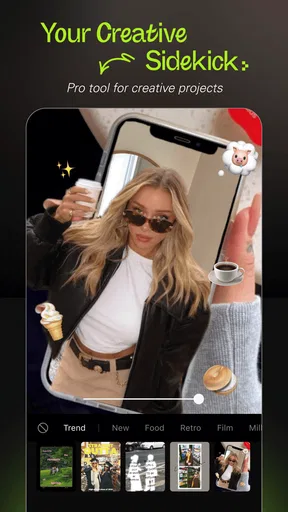
When I first opened Hypic - Photo Editor & AI Art, I was immediately drawn in by its sleek and intuitive interface. It’s one of those apps where you don’t feel overwhelmed by too many options right off the bat, which is a relief. The home screen neatly categorizes its features, making it easy for even the most novice user to dive right in.
Features Galore
One of the standout features of Hypic is its AI-powered art transformations. With a simple upload, your photos can be converted into various art styles, from classic oil paintings to modern digital art. I tried it with a picture of my morning coffee, and the results were seriously impressive. It’s like having a personal artist in your pocket!
The app also boasts a variety of editing tools. You can adjust brightness, contrast, and saturation with ease. There’s a selection of filters that can give your photos a vintage feel or a vibrant pop. And let’s not forget the retouching tools – perfect for those times when you need a little touch-up.
User Experience
Using the app felt like a breeze. The developers have clearly put a lot of thought into usability. Each feature is accompanied by helpful tips, so you’re never left wondering how to achieve your desired effect. Plus, the app runs smoothly without any noticeable lag, even when applying more complex edits.
A practical way to build a consistent look
One useful way to approach Hypic is to decide on the mood before touching the controls. For a set of holiday pictures, I might want gentle color and similar contrast across the whole group; for a single playful portrait, a bold filter or art transformation may be the point. Choosing that direction first makes it easier to stop before an image collects too many competing effects.
I also recommend comparing an edit with its original at a few points, rather than judging only the final screen. A filter can make a photo feel lively while quietly pushing skin tones or shadows too far. If the app’s controls let me tune the image, I would make one adjustment at a time—brightness first, then contrast or saturation—and check whether each change solves a real problem. That is more reliable than stacking fixes just because they are available.
Where it fits among photo editors
Compared with a basic gallery editor, Hypic is appealing when I want a more expressive result without moving to desktop software. Its mix of conventional adjustments and AI art effects makes it suitable for quick social images, while a minimalist editor may be faster if I only need to straighten a picture or make a small exposure correction. A more specialized desktop workflow is still the better choice when precision, repeatable color management, or careful retouching matters more than speed.
The difference is not simply about how many tools an editor has. It is about whether I want the app to help me explore a visual style or to make a quiet, accurate correction. Hypic leans toward playful transformation and accessible editing. I would choose it for experimentation, but I would not make it my only tool for every photograph, particularly when the image has documentary or professional importance.
Everyday edits that make sense
Imagine I take a quick picture of a friend at an outdoor café and want to share it later. I could first crop out a distracting edge, then make a modest brightness adjustment if the face looks too dark, and finally try a filter to see whether it suits the warm café setting. If I decide to use an art effect instead, I would treat that as a creative alternative rather than a correction, and keep the original available for a natural-looking version.
That sort of small workflow is where the app’s range feels useful: I can start with a straightforward fix and choose whether to make the image more stylized. For a batch of photos from the same outing, I would review each one rather than assuming the same filter works equally well across different lighting. A preset that flatters a sunny scene can make a shaded portrait look muddy, so consistency should come from deliberate choices, not automatic repetition.
Who will enjoy it, and who may not
I think Hypic is a good fit for casual photographers, social-media users, and anyone who likes trying visual treatments but does not want a steep learning curve. It can also be handy when I want a quick portrait touch-up or an eye-catching version of an everyday subject. Its current version is 7.8.0, it works on Android 6.0 and later, and it is rated for Everyone, so it is accessible to a broad range of Android users.
I would steer away from it if my main goal were meticulous, repeatable editing or if I strongly preferred a plain tool with no creative effects. The app is free to install, though it offers in-app purchases ranging from $2.99 to $159.99 per item, so I would check the cost shown for any optional purchase before committing. It was released on January 3, 2023, and has around 1,300 written reviews; neither age nor review volume tells me whether a particular paid option is worthwhile, so I would judge that against how often I expect to use it.
Sharing Your Creations
Once you've crafted your masterpiece, Hypic makes it easy to share directly to your social media platforms. Whether you want to wow your Instagram followers or update your Facebook profile with a new artsy photo, it’s all done with a tap. The app even offers options to save in different resolutions, catering to both online sharing and high-quality prints.
Even with convenient sharing, I would pause before sending an image onward. A quick final review lets me catch an awkward crop, an overly strong retouch, or something in the background I had not meant to include. I would also check the destination and intended audience before posting. For a keepsake or a print, I would inspect the saved result at a larger size rather than relying only on how it looked on a phone screen.
Final Thoughts
Overall, Hypic - Photo Editor & AI Art is a fantastic tool for anyone looking to elevate their photos without the hassle of complicated software. Its combination of AI art transformations and user-friendly editing tools makes it a go-to for both amateur and seasoned photographers. Whether you’re looking to impress friends on social media or just have fun experimenting with your photos, Hypic has got you covered.
If you’re ready to unleash your creativity, I’d definitely recommend giving Hypic a try. It’s available on both Android and iOS, so you can start transforming your photos no matter what device you use. Happy editing!
My recommendation comes with a practical boundary: use Hypic when the goal is a quick, expressive edit, and keep another option available for work that needs precise control or a faithful record. I would begin with a non-sensitive image, explore the effect I actually want, and make sharing a conscious last step. That approach lets the app be fun without turning convenience into an automatic choice.
Pros
- User-friendly interface for quick edits.
- Wide range of AI-generated art styles.
- High-quality filters enhance photos.
- Supports batch processing of images.
- Regular updates with new features.
Cons
- Occasional lag on older devices.
- Limited free features; premium needed.
- In-app ads can be intrusive.
- Large file size may consume storage.
- Requires constant internet for best use.
FAQs for Hypic - Photo Editor & AI Art
What features does Hypic - Photo Editor & AI Art offer?
Hypic provides a comprehensive suite of tools for photo editing, including filters, adjustments, and retouching options. It also features AI-powered art transformations that can turn your photos into stunning artworks. Users can enjoy features like background removal, color enhancements, and custom overlays to create unique images.
Is Hypic - Photo Editor & AI Art free to use?
Hypic is available as a free app with basic editing features. However, to access premium tools and additional AI art styles, users may need to subscribe to a paid plan. The app offers in-app purchases that unlock advanced functionalities and eliminate ads for a smoother experience.
How user-friendly is Hypic for beginners?
Hypic is designed with an intuitive interface that caters to both beginners and advanced users. The app offers guided tutorials and easy-to-follow instructions, making it accessible for those new to photo editing. Its user-friendly design ensures that even first-time users can navigate and utilize its features effectively.
Does Hypic support high-resolution image editing?
Yes, Hypic supports high-resolution image editing, allowing users to work with detailed photos without compromising quality. The app ensures that edits and transformations maintain the original resolution, ensuring that the final output is crisp and clear, suitable for both digital and print media.
Is Hypic available on both Android and iOS platforms?
Hypic is available for download on both Android and iOS devices. Users can find the app on the Google Play Store and Apple App Store. This cross-platform availability ensures that users can enjoy its features regardless of their device choice, with regular updates to enhance functionality.


